

Cengage Explore™ Product Updates
Learn how ongoing updates to Explore are enhancing learning experiences, improving engagement, and supporting student success.
Latest Updates
October 27, 2026
A clearer, more manageable Gradebook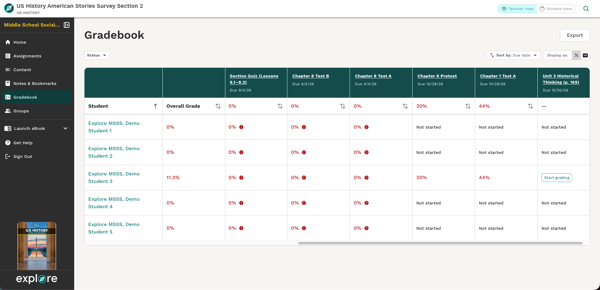
Several updates make the Gradebook easier to scan and manage:
- Gradebook cells now focus on the grade or activity status teachers need most, while additional attempt details remain available in the Attempt Overview.
- Longer activity titles are easier to identify, with updated headings that provide more space while keeping due dates visible.
- Teachers can now reset an edited final grade to the grade calculated by Explore.
What this improves: Creates a cleaner Gradebook experience while giving teachers more control when reviewing and adjusting grades.
A quicker view of student progress
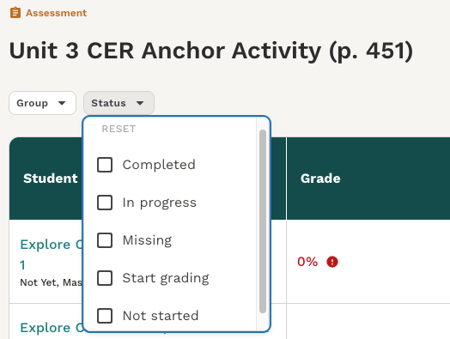 New filters on the Activity Detail page help teachers quickly narrow the class view by group and assignment status. Filters can be combined, and class performance information updates to reflect the students currently shown.
What this improves: Makes it easier to see where students stand on a specific activity and quickly focus on groups or statuses that need attention.
More accurate information for students with accommodations
Student-specific accommodations are now reflected more consistently across Gradebook and related activity views, including adjusted due dates, unavailable dates, and allowed attempts.
What this improves: Gives teachers and students more accurate assignment information based on each student’s individual settings.
Additional fixes and improvements
This release also includes smaller updates to improve assignment status accuracy, activity display, content filtering, and overall platform reliability.
Previous Releases
October 19, 2026
Expanded Gradebook views
Explore continues to make it easier for teachers to review student work and move between class-, activity-, and student-level information.
New Activity Detail page
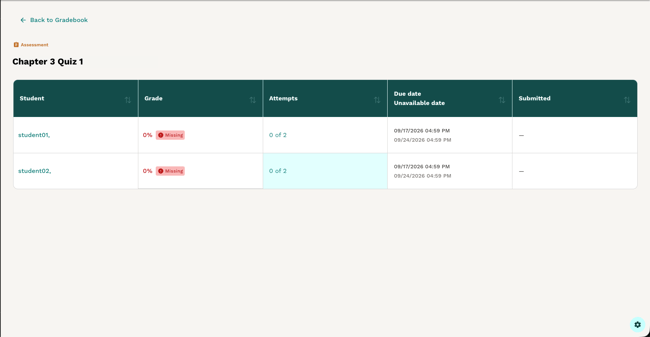
Teachers can now see all students’ grades, attempts, submission dates, and due dates for a specific activity in one dedicated view. Selecting an activity name from the Gradebook or Student Detail page opens the Activity Detail page, where teachers can sort results, review individual student details, and manage attempts or scores.
What this improves: Gives teachers a focused way to compare class progress, identify submissions or grades that need attention, and take grading actions without scanning the full Gradebook.
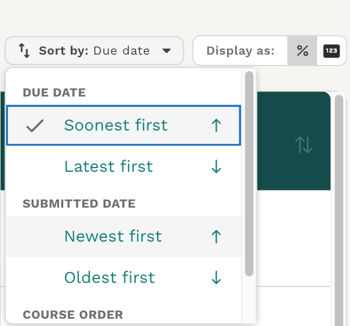
Student Detail page updates
Additional filtering and sorting options make it easier to review an individual student’s work by status, due date, submission date, or Table of Contents order. Teachers can also view scores as points or percentages.
What this improves: Helps teachers quickly focus on missing, in-progress, completed, or ready-to-grade work when reviewing an individual student’s progress.
Easier Gradebook scrolling
Gradebook table headers now remain visible while teachers scroll through longer tables.
What this improves: Keeps column information in view and makes longer Gradebooks easier to review.
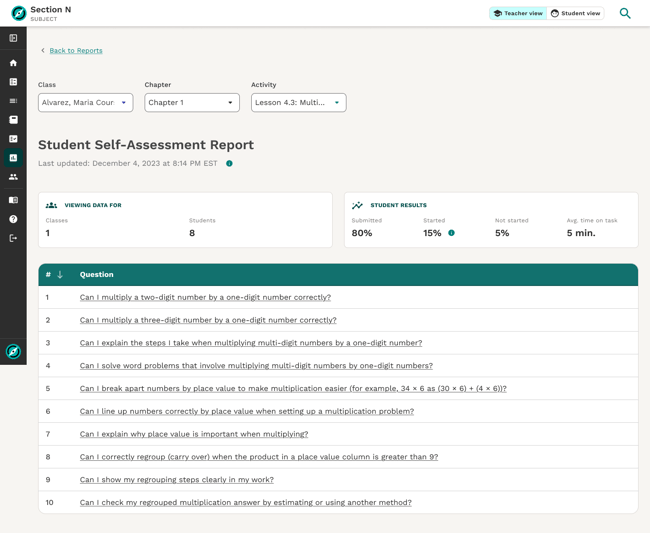 Student Self-Assessment Report
Available in Big Ideas Math products.
Teachers can now view results from assigned Student Self-Assessment activities in a dedicated report. Student self-ratings for each target or success criterion appear together in one place, making it easy to see how students across the class feel about their progress.
What this improves: Gives teachers a quick pulse check on student confidence and helps identify areas where additional support or discussion may be helpful.
Content Studio updates
Available in select Explore titles.
Several updates make the Content Studio experience clearer and more consistent with the rest of Explore:
- The Beta label has been removed from the Explore left-hand navigation panel.
- The workflow for adding Content Studio materials to a course now uses Add activity terminology instead of Save to Content.
- A fix ensures Content Studio launches correctly in affected supported Oklahoma courses.
What this improves: Creates a clearer, more consistent Content Studio experience and ensures supported courses can access the functionality as expected.
Additional reliability and experience improvements
Assignment and activity reliability
Additional fixes address activity launch and submission behavior, assignment-status counts, and edge cases that could prevent students from starting assigned work.
Gradebook accuracy
Updates address assignment-status and score-display behavior, including cases involving student accommodations.
What this improves: Continues to address issues that caused classroom interruptions during back-to-school and supports more dependable assignment and Gradebook workflows.
K–5 navigation
Long folder names in the Mini Table of Contents are now shortened in the display, creating a cleaner and easier-to-follow navigation experience.
Accessibility and interface consistency
Additional updates improve keyboard and screen-reader support and address navigation, mobile display, and other interface consistency issues.
What this improves: Supports a more accessible and consistent Explore experience across common workflows.
October 6, 2026
Content Studio expands across Middle School Social Studies. 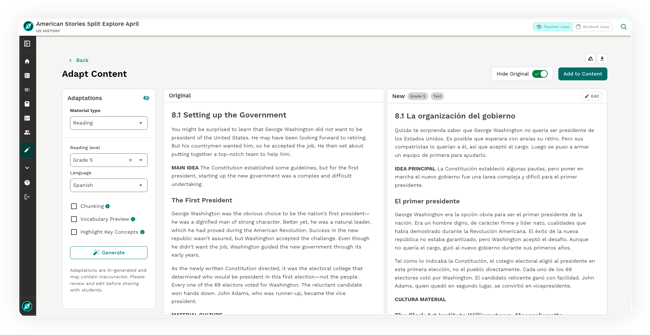
Content Studio is now available in six Middle School Social Studies courses, expanding access to more teachers and students. Teachers can also save adapted materials directly to the Explore learning path, assign them to students, and launch them alongside other course content.
Now available in: World Cultures & Geography, World History Great Civilizations, U.S. History American Stories: Beginnings to 1877, and three Oklahoma Middle School Social Studies courses.
What this improves: Makes it easier for teachers to adapt instructional materials and keep those resources together with the rest of their Explore course content.
Easier ways to review student progress in Gradebook
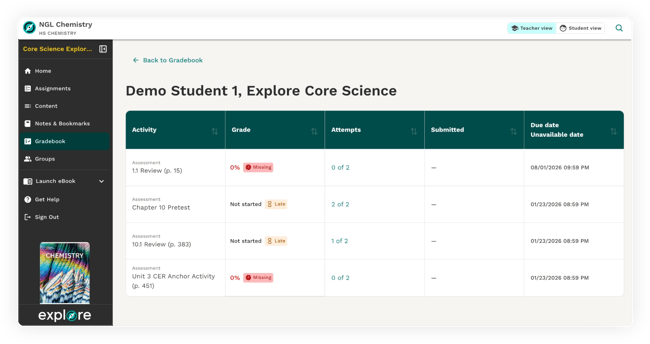 A new Student Detail page now appears when teachers select a student in the Gradebook to see assignments, grades, attempts, submission dates, and due dates together in a dedicated view.
New sorting and filtering options also make it easier to organize Gradebook information and find student work that needs attention.
What this improves: Gives teachers a clearer way to review individual student progress, complete grading tasks, and focus on work that needs attention.
Additional experience and reliability improvements
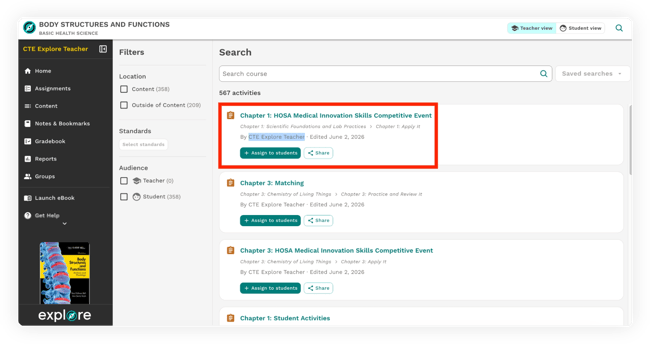 New labels make it easier for teachers to identify activities they have authored or edited. Giving them a quicker way to find the custom content they’re looking for.
Saved searches are once again available in Explore, along with updates that make search results and content-management workflows easier to use.
This release also includes Gradebook fixes that improve the accuracy of assignment status and score displays.
What this improves: Supports smoother day-to-day teacher workflows and a more consistent, reliable Explore experience.
September 22, 2026
Improved Search Results
Search improvements make it easier to find relevant content when using multiple search terms. Results that match all searched words are now prioritized, while unrelated results are excluded.
What this improves: More accurate, relevant results when searching for content in Explore.
Full eBook Access Restored
The ‘Launch eBook’ link in the Explore sidebar has been restored for supported disciplines, giving teachers and students convenient access to the full eBook content available for their role.
Full eBook access is not currently available for Math courses.
September 17, 2026
Easier content discovery
Finding and adding activities in the Content Bank is now simpler, with cleaner search results, easier filter management, and a consistent + Add action.
What this improves: A more intuitive, consistent path for teachers to discover and add activities to their courses.
Assignment launch and content access
We've made improvements to the assignment experience to help students and teachers more reliably launch, open, and access assignments and content.
What this improves: Smoother access to classroom activities and fewer interruptions when launching and working with Explore content.
Activity experience and functionality
Several updates improve how activities work across common teacher and student workflows, including answer-key visibility, printing options, student file uploads, and activity editing.
What this improves: A more consistent activity experience and more reliable access to the tools teachers and students need.
Gradebook improvements
Updates improve Gradebook color-coding and visual presentation, making grades easier to read and understand at a glance.
What this improves: A cleaner, more consistent view of student performance.
Platform speed, security, and reliability
Behind-the-scenes improvements strengthen content loading, platform performance, security, and browser behavior.
What this improves: Supports a faster, more secure, and more reliable Explore experience.
September 8, 2026
Student assignment review and feedback
We’ve made it easier for students to review submitted work and understand teacher feedback.
- Students in grades 6–12 can view teacher comments together in one place when reviewing an assignment attempt.
- The attempt review experience has been streamlined to focus on results, submission status, and key attempt information.
What this improves: A clearer, less distracting way for students to review their work, results, and teacher feedback.
Clearer diagnostic assessment experience
Available in Math & YOU Grades 3–Algebra 2.
Improvements to the Diagnostic Adaptive Progression (DAP) experience more clearly distinguish these diagnostic assessments from graded coursework. Completed assessments display “Done” instead of a numeric Gradebook score, and grade-editing options are removed for DAP activities.
What this improves: Reinforces the diagnostic purpose of DAP and helps prevent unintended changes to diagnostic results.
Easier access to standards
Standards now open in a dedicated panel within Activity View, making standards information easier to access and review while working with an activity.
Clearer LockDown Browser guidance
Improved messages give users clearer next steps when Respondus LockDown Browser needs to be updated or cannot launch.
What this improves: Helps reduce confusion and makes it easier to resolve issues when accessing secured assessments.
Additional experience and accessibility improvements
This release also includes fixes supporting search and filtering, assignment displays, activity layouts, accessibility, and other common Explore workflows.
September 3, 2026
Administrator reporting
Eligible school and district administrators can access Activity Performance and Standards Performance reports through the Cengage School portal. District administrators can review information across schools in their district, while school administrators can access information for their assigned schools.
What this improves: Gives administrators broader visibility into student performance and helps them identify strengths, gaps, and instructional priorities across their organization.
Administrator reporting is not available for districts accessing Explore through an LMS.
District standards configuration
District administrators can configure which State Standards are available to teachers for eligible Explore titles, including keeping multiple standards sets active.
What this improves: Gives districts greater control over standards alignment while creating a more focused and consistent experience for teachers.
AI settings for LMS districts
Districts that access Explore through an LMS can now use the Cengage School portal to manage supported AI settings. This setting currently applies to Content Studio in National Geographic Learning World Cultures and Geography.
What this improves: Expands district-level administrative control over how supported AI functionality is used in Explore.
Platform reliability
Behind-the-scenes platform improvements.
What this improves: Helps reduce interruptions and supports a more reliable experience for users.
Recent visual updates to the Cengage School portal also more closely align it with Explore, creating a more consistent experience as administrators access Explore settings and reporting.
August 24, 2026
More flexible Gradebook tools
We’ve made several improvements to help teachers more easily organize and work with Gradebook information.
Teachers can sort assignments, filter students by course groups, switch between points and percentages, and export Gradebook data. The Student Attempt Overview also brings a student's activity history, attempts, scores, dates, and grading information together in one place.
Teachers can also delete completed assessment attempts when needed.
What this improves: Makes it easier to find and understand student performance information and gives teachers more flexibility to manage student attempts in real classroom situations.
Diagnostic Adaptive Progression reporting
Available in Math & YOU Grades 3–Algebra 2.
Teachers can use a dedicated DAP Report to review overall diagnostic performance, performance by domain and topic, and individual student results.
What this improves: Helps teachers identify learning gaps and use diagnostic results to target instruction based on student needs.
DAP and Self-Assessment activity experience
Available in titles that include DAP and/or Self-Assessment activities.
Improvements to assignment settings and activity displays create a more consistent, completion-focused experience for these activity types.
What this improves: Better aligns the Explore experience with the purpose of diagnostic and self-assessment activities and reduces confusion around scores and completion.
Navigation and mobile experience
Students can now click anywhere on a folder row to open it, and key activity tools are consolidated into a single Action menu on mobile devices.
What this improves: Easier course navigation and a cleaner activity experience on smaller screens.
Accessibility and platform reliability
Additional improvements address assignment display and dates, Gradebook behavior, responsive layouts, screen-reader support, navigation, course launching, and overall platform stability.
What this improves: Supports a more reliable, accessible, and consistent experience across common Explore workflows.
July 7, 2026
More efficient assignment management
Teachers can update dates for multiple activities at once, reducing repetitive setup when adjusting pacing or managing multiple assignments.
Teachers can also set an Unavailable Date to control when an activity stops accepting submissions.
What this improves: Gives teachers more flexibility to manage activity timing and availability while reducing repetitive work.
Student-level accommodations
Teachers can set individualized assignment dates and attempt limits for individual students.
What this improves: Gives teachers more flexibility to support individual student needs directly within Explore.
Secure assessment options
Explore supports Respondus LockDown Browser for supported assessments. When enabled, LockDown Browser restricts access to other websites, applications, and tools during an assessment.
What this improves: Gives teachers and districts an additional option for supporting secure assessment experiences.
Faster content management
Improvements to the Explore Content Page support faster load times and responsiveness as teachers browse, filter, organize, and assign content.
What this improves: A smoother experience across common content-management workflows.
Content Studio experience improvements
Available in titles that include Content Studio.
Improvements to Content Studio make the experience more responsive across devices, simplify editing and controls, and improve the speed and reliability of content adaptations.
What this improves: Makes it easier for teachers to adapt supported Cengage content for their students within their Explore workflow.
Gradebook, accessibility, and platform reliability
Additional improvements address Gradebook loading and display, accessibility, page load times, roster handling, and overall platform stability.
What this improves: Supports smoother day-to-day workflows and a more reliable and accessible Explore experience.
October 19, 2026 Expanded Gradebook views Explore continues to make it easier for teachers to review student work and move between class-, activity-, and student-level information. New Activity Detail page Teachers can now see all students’ grades, attempts, submission dates, and due dates for a specific activity in one dedicated view. Selecting an activity name from the Gradebook or Student Detail page opens the Activity Detail page, where teachers can sort results, review individual student details, and manage attempts or scores. What this improves: Gives teachers a focused way to compare class progress, identify submissions or grades that need attention, and take grading actions without scanning the full Gradebook. Student Detail page updates Additional filtering and sorting options make it easier to review an individual student’s work by status, due date, submission date, or Table of Contents order. Teachers can also view scores as points or percentages. What this improves: Helps teachers quickly focus on missing, in-progress, completed, or ready-to-grade work when reviewing an individual student’s progress. Easier Gradebook scrolling Gradebook table headers now remain visible while teachers scroll through longer tables. What this improves: Keeps column information in view and makes longer Gradebooks easier to review. Student Self-Assessment Report Available in Big Ideas Math products. Teachers can now view results from assigned Student Self-Assessment activities in a dedicated report. Student self-ratings for each target or success criterion appear together in one place, making it easy to see how students across the class feel about their progress. What this improves: Gives teachers a quick pulse check on student confidence and helps identify areas where additional support or discussion may be helpful. Content Studio updates Available in select Explore titles. Several updates make the Content Studio experience clearer and more consistent with the rest of Explore: The Beta label has been removed from the Explore left-hand navigation panel. The workflow for adding Content Studio materials to a course now uses Add activity terminology instead of Save to Content. A fix ensures Content Studio launches correctly in affected supported Oklahoma courses. What this improves: Creates a clearer, more consistent Content Studio experience and ensures supported courses can access the functionality as expected. Additional reliability and experience improvements Assignment and activity reliability Additional fixes address activity launch and submission behavior, assignment-status counts, and edge cases that could prevent students from starting assigned work. Gradebook accuracy Updates address assignment-status and score-display behavior, including cases involving student accommodations. What this improves: Continues to address issues that caused classroom interruptions during back-to-school and supports more dependable assignment and Gradebook workflows. K–5 navigation Long folder names in the Mini Table of Contents are now shortened in the display, creating a cleaner and easier-to-follow navigation experience. Accessibility and interface consistency Additional updates improve keyboard and screen-reader support and address navigation, mobile display, and other interface consistency issues. What this improves: Supports a more accessible and consistent Explore experience across common workflows.
October 6, 2026 Content Studio expands across Middle School Social Studies. Content Studio is now available in six Middle School Social Studies courses, expanding access to more teachers and students. Teachers can also save adapted materials directly to the Explore learning path, assign them to students, and launch them alongside other course content. Now available in: World Cultures & Geography, World History Great Civilizations, U.S. History American Stories: Beginnings to 1877, and three Oklahoma Middle School Social Studies courses. What this improves: Makes it easier for teachers to adapt instructional materials and keep those resources together with the rest of their Explore course content. Easier ways to review student progress in Gradebook A new Student Detail page now appears when teachers select a student in the Gradebook to see assignments, grades, attempts, submission dates, and due dates together in a dedicated view. New sorting and filtering options also make it easier to organize Gradebook information and find student work that needs attention. What this improves: Gives teachers a clearer way to review individual student progress, complete grading tasks, and focus on work that needs attention. Additional experience and reliability improvements New labels make it easier for teachers to identify activities they have authored or edited. Giving them a quicker way to find the custom content they’re looking for. Saved searches are once again available in Explore, along with updates that make search results and content-management workflows easier to use. This release also includes Gradebook fixes that improve the accuracy of assignment status and score displays. What this improves: Supports smoother day-to-day teacher workflows and a more consistent, reliable Explore experience.
September 22, 2026 Improved Search Results Search improvements make it easier to find relevant content when using multiple search terms. Results that match all searched words are now prioritized, while unrelated results are excluded. What this improves: More accurate, relevant results when searching for content in Explore. Full eBook Access Restored The ‘Launch eBook’ link in the Explore sidebar has been restored for supported disciplines, giving teachers and students convenient access to the full eBook content available for their role. Full eBook access is not currently available for Math courses.
September 17, 2026 Easier content discovery Finding and adding activities in the Content Bank is now simpler, with cleaner search results, easier filter management, and a consistent + Add action. What this improves: A more intuitive, consistent path for teachers to discover and add activities to their courses. Assignment launch and content access We've made improvements to the assignment experience to help students and teachers more reliably launch, open, and access assignments and content. What this improves: Smoother access to classroom activities and fewer interruptions when launching and working with Explore content. Activity experience and functionality Several updates improve how activities work across common teacher and student workflows, including answer-key visibility, printing options, student file uploads, and activity editing. What this improves: A more consistent activity experience and more reliable access to the tools teachers and students need. Gradebook improvements Updates improve Gradebook color-coding and visual presentation, making grades easier to read and understand at a glance. What this improves: A cleaner, more consistent view of student performance. Platform speed, security, and reliability Behind-the-scenes improvements strengthen content loading, platform performance, security, and browser behavior. What this improves: Supports a faster, more secure, and more reliable Explore experience.
September 8, 2026 Student assignment review and feedback We’ve made it easier for students to review submitted work and understand teacher feedback. Students in grades 6–12 can view teacher comments together in one place when reviewing an assignment attempt. The attempt review experience has been streamlined to focus on results, submission status, and key attempt information. What this improves: A clearer, less distracting way for students to review their work, results, and teacher feedback. Clearer diagnostic assessment experience Available in Math & YOU Grades 3–Algebra 2. Improvements to the Diagnostic Adaptive Progression (DAP) experience more clearly distinguish these diagnostic assessments from graded coursework. Completed assessments display “Done” instead of a numeric Gradebook score, and grade-editing options are removed for DAP activities. What this improves: Reinforces the diagnostic purpose of DAP and helps prevent unintended changes to diagnostic results. Easier access to standards Standards now open in a dedicated panel within Activity View, making standards information easier to access and review while working with an activity. Clearer LockDown Browser guidance Improved messages give users clearer next steps when Respondus LockDown Browser needs to be updated or cannot launch. What this improves: Helps reduce confusion and makes it easier to resolve issues when accessing secured assessments. Additional experience and accessibility improvements This release also includes fixes supporting search and filtering, assignment displays, activity layouts, accessibility, and other common Explore workflows.
September 3, 2026 Administrator reporting Eligible school and district administrators can access Activity Performance and Standards Performance reports through the Cengage School portal. District administrators can review information across schools in their district, while school administrators can access information for their assigned schools. What this improves: Gives administrators broader visibility into student performance and helps them identify strengths, gaps, and instructional priorities across their organization. Administrator reporting is not available for districts accessing Explore through an LMS. District standards configuration District administrators can configure which State Standards are available to teachers for eligible Explore titles, including keeping multiple standards sets active. What this improves: Gives districts greater control over standards alignment while creating a more focused and consistent experience for teachers. AI settings for LMS districts Districts that access Explore through an LMS can now use the Cengage School portal to manage supported AI settings. This setting currently applies to Content Studio in National Geographic Learning World Cultures and Geography. What this improves: Expands district-level administrative control over how supported AI functionality is used in Explore. Platform reliability Behind-the-scenes platform improvements. What this improves: Helps reduce interruptions and supports a more reliable experience for users. Recent visual updates to the Cengage School portal also more closely align it with Explore, creating a more consistent experience as administrators access Explore settings and reporting.
August 24, 2026 More flexible Gradebook tools We’ve made several improvements to help teachers more easily organize and work with Gradebook information. Teachers can sort assignments, filter students by course groups, switch between points and percentages, and export Gradebook data. The Student Attempt Overview also brings a student's activity history, attempts, scores, dates, and grading information together in one place. Teachers can also delete completed assessment attempts when needed. What this improves: Makes it easier to find and understand student performance information and gives teachers more flexibility to manage student attempts in real classroom situations. Diagnostic Adaptive Progression reporting Available in Math & YOU Grades 3–Algebra 2. Teachers can use a dedicated DAP Report to review overall diagnostic performance, performance by domain and topic, and individual student results. What this improves: Helps teachers identify learning gaps and use diagnostic results to target instruction based on student needs. DAP and Self-Assessment activity experience Available in titles that include DAP and/or Self-Assessment activities. Improvements to assignment settings and activity displays create a more consistent, completion-focused experience for these activity types. What this improves: Better aligns the Explore experience with the purpose of diagnostic and self-assessment activities and reduces confusion around scores and completion. Navigation and mobile experience Students can now click anywhere on a folder row to open it, and key activity tools are consolidated into a single Action menu on mobile devices. What this improves: Easier course navigation and a cleaner activity experience on smaller screens. Accessibility and platform reliability Additional improvements address assignment display and dates, Gradebook behavior, responsive layouts, screen-reader support, navigation, course launching, and overall platform stability. What this improves: Supports a more reliable, accessible, and consistent experience across common Explore workflows.
July 7, 2026 More efficient assignment management Teachers can update dates for multiple activities at once, reducing repetitive setup when adjusting pacing or managing multiple assignments. Teachers can also set an Unavailable Date to control when an activity stops accepting submissions. What this improves: Gives teachers more flexibility to manage activity timing and availability while reducing repetitive work. Student-level accommodations Teachers can set individualized assignment dates and attempt limits for individual students. What this improves: Gives teachers more flexibility to support individual student needs directly within Explore. Secure assessment options Explore supports Respondus LockDown Browser for supported assessments. When enabled, LockDown Browser restricts access to other websites, applications, and tools during an assessment. What this improves: Gives teachers and districts an additional option for supporting secure assessment experiences. Faster content management Improvements to the Explore Content Page support faster load times and responsiveness as teachers browse, filter, organize, and assign content. What this improves: A smoother experience across common content-management workflows. Content Studio experience improvements Available in titles that include Content Studio. Improvements to Content Studio make the experience more responsive across devices, simplify editing and controls, and improve the speed and reliability of content adaptations. What this improves: Makes it easier for teachers to adapt supported Cengage content for their students within their Explore workflow. Gradebook, accessibility, and platform reliability Additional improvements address Gradebook loading and display, accessibility, page load times, roster handling, and overall platform stability. What this improves: Supports smoother day-to-day workflows and a more reliable and accessible Explore experience.